mcpro24fps manual video camera
Chantal Pro SIAPhotography
4.580.00 Reviews
- Version
- 043dd
- Installs
- 10.00K
- Age Rating
- Everyone
Screenshots
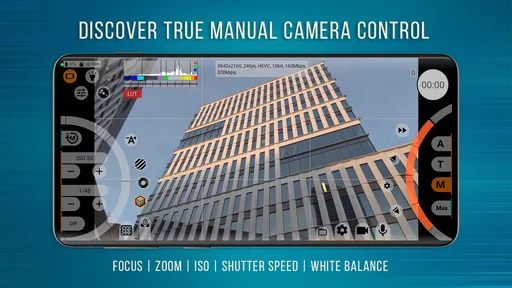
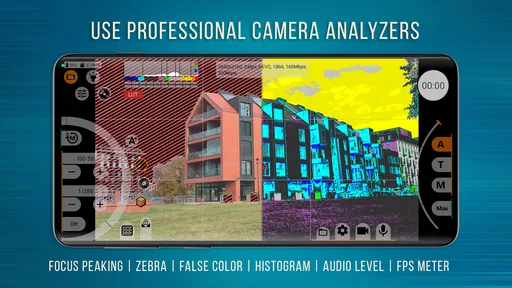
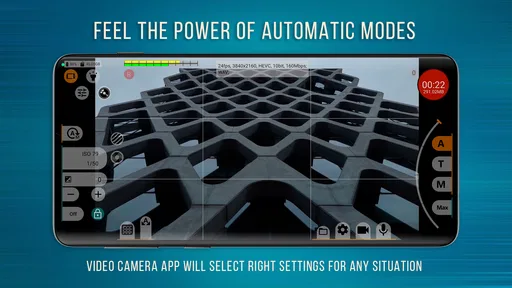
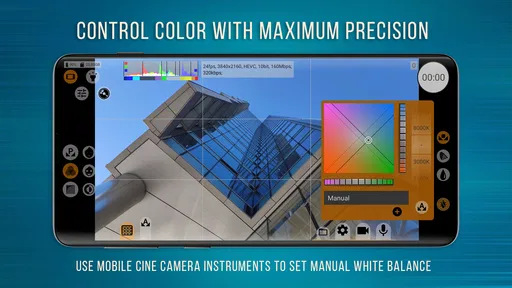
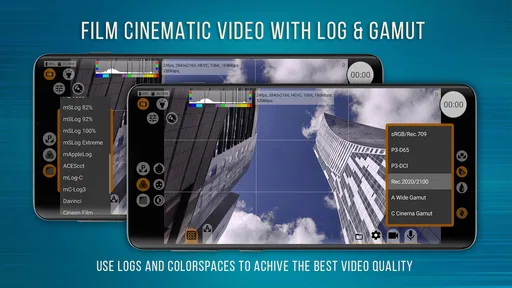
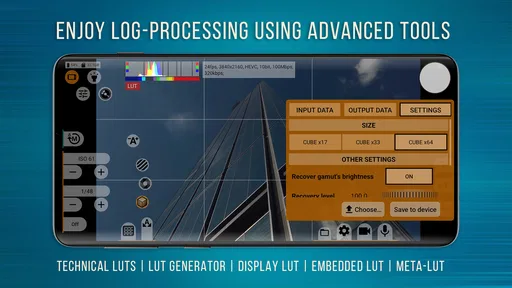
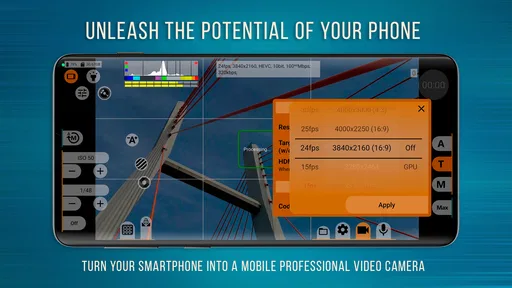
Our Review of mcpro24fps manual video camera
 Analysis by Appyee
If you're like me and love capturing the world through your smartphone, then you've probably dabbled with various camera apps. Let me introduce you to the mcpro24fps Manual Video Camera app, a tool that’s been turning heads in the videography world. It's like having a professional camera tucked right into your pocket. No kidding!
Where this camera app fits today
My first impression is that mcpro24fps is built for people who want to decide how a phone video is made, rather than accept whatever the automatic camera chooses. That distinction matters more than a long feature list: when light changes, a subject moves, or a shot needs to match another clip, manual control can make the result more consistent. If you mainly want to point, tap, and share, your phone’s regular camera is likely the easier tool.
It is a paid photography app from Chantal Pro SIA, priced at $19.99, with in-app purchases ranging from $0.99 to $5.49 per item. That puts it in a different conversation from a free camera app: I would consider the purchase only if I expected to use manual video controls regularly. Its average rating is 4.5 from around 3,700 ratings, and it has over 10,000 installs. Those figures suggest an established audience, but they are not a substitute for checking whether the app fits your own phone and workflow.
The app is rated Everyone, and its current version is 043dd. It first appeared on February 9, 2019, and supports Android 7.0 and later. The long-running version history gives existing users a reason to pay attention to changes over time, but a version label alone does not tell me which controls or recording options changed. I would treat the version as a useful compatibility detail, not as proof of a particular new feature or improvement.
Why Choose mcpro24fps?
First things first, this app is designed for those who crave full control over their video shoots. If you've ever been frustrated by the limitations of your phone's native camera, mcpro24fps might just be your new best friend. The app is packed with manual controls that let you tweak settings like a pro.
Features That Stand Out
Right off the bat, the user interface is sleek but doesn't overwhelm you with buttons and options. It’s intuitive enough that you won't need a degree in film studies to get going. Now, let's dive into what makes this app a game-changer.
- Manual Controls: You can adjust everything from focus, exposure, ISO, and even white balance. It's like having the power of a DSLR in your hand.
- High Bitrate Recording: This feature ensures your videos are captured in high quality, making them look crisp and professional.
- Log Profiles: For those who love to color grade their footage, log profiles are a boon.
Without getting too technical, these features give you the flexibility to shoot videos that match your creative vision. Whether you're filming a short film, a vlog, or even a family event, the results are stunning.
Making manual control useful in everyday filming
The controls are most valuable when I need several clips to look as though they belong together. For example, if I’m recording a short cooking video near a window, automatic exposure can shift as I move a plate between the bright window and the darker counter. Setting exposure deliberately helps avoid distracting brightness changes between takes. I would still check the preview after moving the phone or changing the light; a manual setting that worked a minute ago can become the wrong one.
For a talking-head clip, focus is another practical choice. If the phone keeps shifting focus between my face and something behind me, locking or adjusting focus can keep attention where I want it. But manual focus is not automatically better: if I’m following a child or a pet, continuous autofocus may be more forgiving. I’d choose the method based on the subject’s movement, not simply because manual controls are available.
White balance is especially useful when I want separate shots to cut together cleanly. Indoor lighting can make one clip look warm and the next cooler if the camera keeps making its own decisions. Choosing a consistent balance before recording can reduce that mismatch. A small test clip is a sensible habit, because a setting that looks right on the phone screen may need adjustment when viewed on a larger display.
The Learning Curve
Now, I won't sugarcoat it. There is a learning curve. If you're used to point-and-shoot simplicity, you'll need to spend some time getting familiar with all the manual settings. But trust me, it's totally worth it. The app even offers tutorials and guides to help you navigate through its features.
Once you get the hang of it, you’ll find yourself experimenting with different settings and capturing footage that looks like it was shot on professional gear. The satisfaction of nailing that perfect shot is unparalleled.
A practical setup routine
I would not try to learn every control while an important moment is already happening. Before filming something I care about, I’d make a brief test recording, check focus and exposure, then play it back with sound. That catches simple problems—an unexpectedly soft subject, a blown-out window, or a framing choice I dislike—before I have to repeat a whole scene.
For a small project, it also helps to write down or remember the settings used for a key shot. If I return to the same room later, starting from that setup is quicker than guessing from scratch. This is not a substitute for checking the light again; it is just a way to make a repeat shoot more deliberate. I’d keep the workflow simple and change one control at a time, so I can tell what actually improved the image.
High-bitrate recording and log profiles can be useful, but they ask more of the person filming and editing. A log-looking image may appear flat before color work, and a large or demanding video file can be less convenient to move and handle than a casual clip. I would use those options when I have a reason to edit afterward, not just because a more advanced setting sounds inherently superior.
Performance and Usability
On the performance side, mcpro24fps runs smoothly on both Android and iOS devices. I tested it on a mid-range phone, and it handled the app like a champ. No lag, no crashes. Just smooth sailing all the way!
The app's compatibility with various devices is a plus. Whether you're sporting the latest flagship or a trusty older model, you can expect consistent performance.
Device fit and recording trade-offs
Manual camera apps depend on the phone’s camera hardware and software, so I would not assume every setting behaves identically across devices. Before planning a paid project around a particular recording mode, I’d install the app on the phone I intend to use and test the actual camera lens, storage space, and playback workflow. A control being present does not guarantee that every phone offers the same practical result.
Storage is worth thinking about before a long session. Higher-quality recording can use space quickly, so I’d clear room first and make a short sample to judge file size and playback. If the goal is a quick social clip, the native camera may be more convenient; if I’m collecting footage to edit carefully, the extra control can be worth the preparation.
Who will get the most from it
This app makes the most sense for a creator who already knows why they want to control focus, exposure, ISO, or white balance—or is genuinely willing to learn. It can suit a student practising camera basics, a vlogger who wants repeatable indoor shots, or someone filming a small event who prefers to set up a shot rather than trust automation. The value comes from using those controls with intent, not from having them on screen.
I’d steer away from it if I wanted a zero-effort camera for spontaneous family moments, if I rarely record video, or if I do not want to spend time testing settings and handling footage afterward. For simple filming, the built-in camera is usually faster and may already do everything I need. For a production that depends on specialized equipment or a carefully managed multi-camera workflow, a phone app alone may not be the right solution either.
For the Creators
This app is perfect for budding filmmakers and content creators. It offers an affordable way to dive into videography without investing in expensive equipment. You can start shooting professional-looking videos with just your smartphone.
The community around mcpro24fps is vibrant and supportive. You’ll find forums and user groups sharing tips, tricks, and even presets to help you make the most of the app. It's like being part of a creative club where everyone is eager to help each other out.
How it compares with a phone’s usual camera
The standard camera app wins on convenience: it is already familiar, and its automatic choices can be helpful when I have no time to set up a shot. mcpro24fps is appealing for a different reason. It gives a video-focused user more direct control and makes a deliberate, repeatable approach possible. Neither approach is universally better. The useful question is whether I will actually use manual adjustments often enough to justify learning another camera app and paying for it.
Compared with editing a clip after recording, setting exposure and white balance carefully at capture can prevent some inconsistencies from being baked into a sequence. Editing still matters, particularly for log footage, but it cannot reliably rescue every poorly exposed or unfocused take. My practical approach would be to get the image as consistent as possible while filming, then use editing for finishing rather than as a replacement for attention during recording.
What to keep in mind as the app evolves
The release date and current version provide a basic picture of the app’s timeline, but they do not establish a list of changes. I would not infer from the number 043dd that a specific device gained a feature or that an issue was fixed. Existing users should judge an update by how it behaves on their own phone: whether their familiar controls remain accessible, whether their usual test scene records as expected, and whether the resulting files still fit their editing routine.
When an update is available, I’d avoid installing it right before a shoot that cannot be repeated. Testing first is a sensible precaution for any recording tool, especially one tied to a particular phone’s camera capabilities. I’d also keep a simple reference clip from a familiar location; comparing it after an update can make changes in exposure, focus behavior, or workflow easier to spot without assuming what the update was meant to do.
Final Thoughts
In conclusion, if you're serious about videography and want to push the boundaries of your smartphone's camera capabilities, give mcpro24fps Manual Video Camera a shot. It’s more than just an app; it’s a gateway to unlocking your creative potential. Whether you're a novice or a seasoned pro, there's something for everyone here.
So, go on, download it, and start exploring the endless possibilities this app has to offer. Who knows? You might just be the next viral sensation with your stunning videos!
My recommendation
I’d recommend it to someone who wants a phone to behave more like a controllable video camera and is prepared to test settings before relying on them. The strongest reason to choose it is not a promise of instant professional results; it is the chance to make exposure, focus, and color decisions intentionally. If that sounds like part of the fun, the learning effort may pay off. If it sounds like friction between you and a quick recording, stick with the simpler camera you already use.
Before paying, I’d make sure my phone runs Android 7.0 or later and think honestly about how often I record video. Then I’d plan a short practice session, try a familiar indoor scene and a moving subject, and compare the results with the native camera. That gives a much fairer answer than judging a manual camera app by its controls alone: the right choice is the one that helps me get the footage I need without making filming feel like a chore.
Verdict
Strengths of mcpro24fps manual video camera
- Comprehensive manual controls for precise shooting.
- User-friendly interface for easy navigation.
- Supports 4K video recording on compatible devices.
- Real-time histogram for accurate exposure monitoring.
- Customizable resolution and frame rate settings.
Limitations of mcpro24fps manual video camera
- Limited support for some older devices.
- Occasional crashes on certain smartphone models.
- Advanced features may overwhelm beginners.
- Requires in-app purchases for full functionality.
- High battery consumption during extended use.
Other Releases by Chantal Pro SIA
View All
mcpro24fps demo - video camera
Libraries & Demo4.3
Similar Picks in This Category
View All
Google Photos
Google LLC4.4

Gallery
Google LLC4.2

Picsart AI Photo Editor, Video
PicsArt, Inc.3.9

B612 AI Photo&Video Editor
SNOW Corporation4.1

BeautyPlus-Selfie Photo Editor
PIXOCIAL TECHNOLOGY (SINGAPORE) PTE. LTD.4.5

Remini - AI Photo Enhancer
Bending Spoons4.1
Frequently Asked Questions
What is mcpro24fps and who should use it?
mcpro24fps is a professional-grade manual video camera app designed for filmmakers and videographers who want full control over their shooting settings. It offers features such as adjustable frame rates, exposure settings, and focus options. Suitable for both beginners looking to learn manual controls and professionals needing advanced tools.
Does mcpro24fps support 4K video recording?
Yes, mcpro24fps supports 4K video recording, allowing users to capture high-resolution footage. This feature is particularly beneficial for professionals who require detailed and crisp video quality for projects. Keep in mind that recording in 4K may require more storage space and a device that supports high-resolution output.
Can I use external microphones with mcpro24fps?
mcpro24fps supports the use of external microphones, enhancing audio quality for your recordings. This feature is crucial for filmmakers and content creators who need superior sound quality. Ensure your device is compatible with the external microphone, and check settings within the app to optimize audio input.
Are there in-app purchases or additional costs?
While mcpro24fps offers a range of features upon purchase, there may be additional in-app purchases for specific advanced features or updates. It's important to review the app's pricing details on the app store to understand any potential extra costs before downloading.
Is mcpro24fps suitable for beginners?
While mcpro24fps is packed with professional features, its user-friendly interface makes it accessible for beginners. The app provides tutorials and guides to help new users understand and utilize its capabilities. Beginners can start with basic settings and gradually explore more advanced options as they become comfortable.
